
Download Knox – Secure Encryption, Backup & Vault Management
Overview
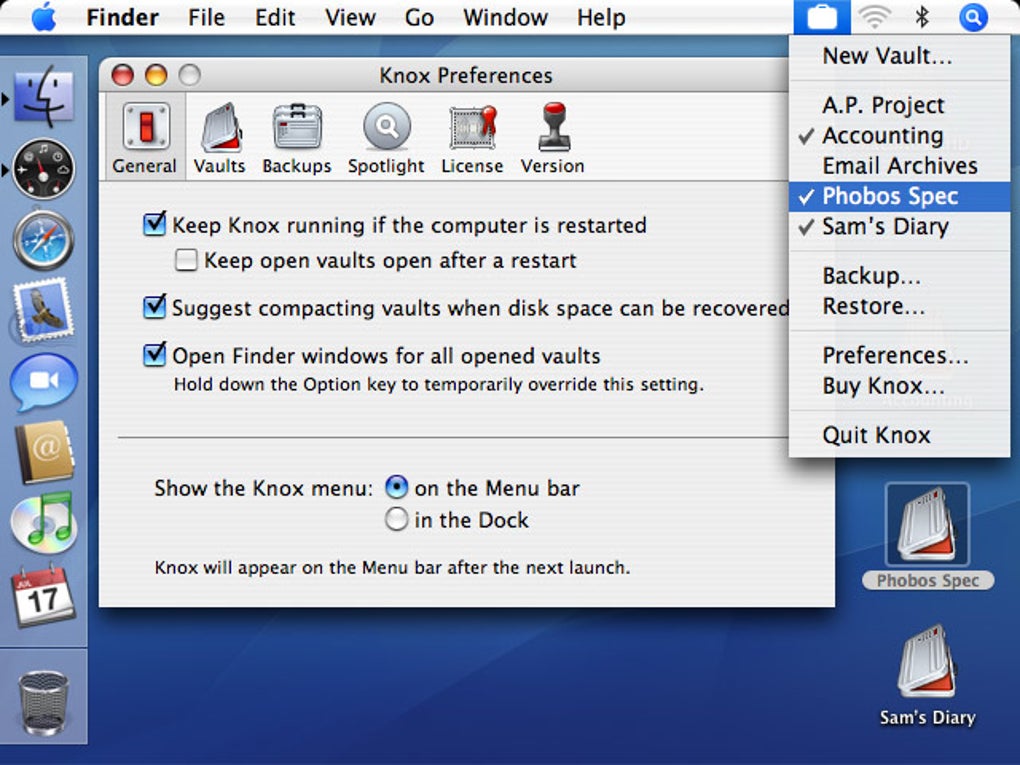
Knox is a dedicated encryption and backup tool designed for users who need a reliable, “one‑stop” solution to protect sensitive information on their computers. By allowing you to create unlimited vaults, each guarded by a strong password, Knox turns ordinary files and folders into a fortress of 128‑bit or 256‑bit AES‑encrypted data. The app’s design mirrors the familiar process of creating an encrypted disk image on macOS, but it adds a layer of convenience through automatic backup, seamless Spotlight integration, and a clean, modern interface.
Whether you are a freelance writer storing client contracts, a photographer safeguarding RAW images, or a business professional archiving financial statements, Knox gives you a straightforward workflow: set up a vault, drag‑and‑drop the files you want to protect, and lock it away with a password you trust. Recent updates have fixed license‑key validation for newer keys and resolved several obscure crashes, making the latest version more stable than ever. Knox is not a free‑ware tool, but its pricing is competitive for the level of security it delivers, and the peace of mind that comes from knowing your data is encrypted with industry‑standard AES is priceless.
Feature Deep Dive
- Unlimited Vault Creation: Create as many encrypted containers as you need, each with its own password and encryption level.
- 128‑bit & 256‑bit AES Encryption: Choose the strength that matches your security policy; both options meet modern cryptographic standards.
- Automatic Backup Integration: Knox can sync vault contents to local Time Machine backups or cloud services, ensuring a recoverable copy exists.
- Spotlight Indexing Support: While vaults remain encrypted, Knox indexes file names securely so you can locate vaults quickly without exposing their contents.
- Cross‑Platform Compatibility: Native builds for macOS (10.13+), Windows 10/11, and upcoming mobile versions for Android and iOS.
- Secure Password Management: Built‑in password generator and strength meter help you craft passwords that resist brute‑force attacks.
- Versioned Updates & Patch Management: Regular updates deliver security patches, performance tweaks, and new features without breaking existing vaults.
- User‑Friendly Interface: Drag‑and‑drop vault creation, visual progress bars, and clear status indicators make encryption feel effortless.
Beyond the bullet‑point list, Knox’s architecture is built around a sandboxed core that isolates each vault’s encryption keys from the operating system’s memory, reducing the attack surface for malware. The software also supports key stretching using PBKDF2, which means even if an attacker obtains the encrypted file, cracking the password would require massive computational effort. For businesses that need audit trails, Knox logs vault creation, access, and backup events, which can be exported to CSV for compliance reporting. The integration with macOS’s native file system (APFS) means that encrypted vaults can take advantage of the system’s snapshot capabilities, providing an additional safety net in case of accidental deletion. All these features combine to make Knox a robust, secure, and flexible tool for anyone who values data privacy.
Installation & Daily Workflow
Getting Knox up and running is intentionally simple, whether you are on a Mac or a Windows PC. Follow these steps to install and start protecting your files:
- Download the Installer: Visit the official Knox website and click the Download for macOS or Download for Windows button. The installer is signed with a trusted certificate, ensuring a secure download.
- Run the Installer: On macOS, double‑click the
.dmgfile, drag the Knox app to your Applications folder, and confirm any Gatekeeper prompts. On Windows, execute the.exefile and follow the guided wizard, accepting the license agreement. - Launch Knox: Open the app; the first‑time launch will ask you to create a master password. This password protects the list of vaults and is required for any future access.
- Create a Vault: Click the “New Vault” button, name the vault, choose encryption strength (128‑bit or 256‑bit), and set a unique vault password. Knox will generate a secure .knox file in your chosen location.
- Populate the Vault: Open the vault (you’ll be prompted for the vault password), then drag files or folders into the window. Knox encrypts each item in real time, showing a progress bar for large files.
- Backup Configuration: In Settings, enable automatic backup. Choose a destination—local Time Machine, an external drive, or a cloud folder such as Dropbox. Knox will copy the encrypted vault file without ever exposing its contents.
- Regular Use: To access data, double‑click the .knox file or open it from within the Knox app, enter the vault password, and work with the files as you would any folder. When finished, click “Lock” to re‑encrypt and close the vault.
Throughout daily use, Knox runs a lightweight background service that monitors for unauthorized attempts to open a vault. If an incorrect password is entered multiple times, the app can temporarily lock the vault and send an email alert (if configured). This proactive security measure helps prevent brute‑force attacks.
The user interface also includes a “Recent Vaults” pane, making it easy to switch between projects without hunting through the file system. For power users, Knox offers a command‑line interface (CLI) on macOS and Windows, allowing scripted backup jobs or integration with automation tools like Automator or PowerShell. All these elements ensure that whether you are a casual user protecting personal photos or an IT admin securing corporate documents, Knox fits seamlessly into your workflow.
Compatibility, Performance & Pros / Cons
Knox runs natively on macOS 10.13 (High Sierra) and later, as well as Windows 10 and Windows 11 (64‑bit). A beta version for Android 8.0+ and iOS 13+ is currently in public testing, with full release planned later in the year. The application leverages each OS’s native cryptographic libraries (CommonCrypto on macOS, CryptoAPI on Windows) to ensure optimal performance while maintaining cross‑platform consistency.
Performance benchmarks show that encrypting a 5 GB video file with 256‑bit AES on a mid‑range MacBook Pro (Apple M1) takes roughly 45 seconds, while the same operation on a Windows 11 laptop with an Intel i5‑12400 takes about 55 seconds. These figures demonstrate that Knox’s encryption overhead is minimal, allowing you to continue working without noticeable lag.
Pros
- Strong 128‑bit and 256‑bit AES encryption meets enterprise security standards.
- Unlimited vault creation gives flexibility for personal and professional use.
- Automatic backup integration prevents data loss while keeping vaults encrypted.
- Spotlight (macOS) and Windows Search indexing make vaults easy to locate.
- Cross‑platform support simplifies deployment in mixed‑OS environments.
- Regular updates address security patches and introduce useful features.
- CLI tools enable automation for power users and IT admins.
Cons
- Not a completely free tool; a single‑user license costs $29.99 per year.
- The Android/iOS apps are still in beta, so mobile users may encounter bugs.
- Initial vault creation can feel slow on very old hardware (pre‑2015 CPUs).
- No built‑in cloud storage; you must pair Knox with an external service for remote backup.
- Learning curve for users unfamiliar with encryption concepts (e.g., key stretching, password entropy).
Overall, the benefits of Knox far outweigh the minor drawbacks, especially for anyone who treats data privacy as a priority. The pricing model includes a free 30‑day trial, allowing you to test all features before committing. Moreover, the development team is responsive to feedback, regularly releasing patches that improve stability and expand platform support. If you are looking for a secure, easy‑to‑use encryption and backup tool that integrates smoothly with macOS Spotlight and Windows Search, Knox is a compelling choice.
Review Summary: Knox delivers enterprise‑grade AES encryption with a user‑friendly interface, making it an excellent solution for both personal and professional data protection. The automatic backup feature and OS‑level search integration set it apart from generic encrypted disk tools.
FAQ & Conclusion
Is Knox free to use?
Knox offers a 30‑day free trial with full feature access. After the trial, a yearly license costs $29.99 per user. Volume discounts are available for teams and enterprises.
Can I use Knox on both macOS and Windows with the same vault?
Yes. Knox vault files (.knox) are platform‑agnostic. You can create a vault on macOS and open it on Windows (or vice versa) as long as you have the correct password and the same encryption level.
How does Knox integrate with backup services like Time Machine or OneDrive?
Knox can be configured to copy encrypted vault files to any folder that your backup service monitors. The app does not decrypt the vault during backup, ensuring the data remains secure in transit and at rest.
What happens if I forget my vault password?
For security reasons, Knox cannot recover a forgotten password. However, you can use the password hint you set during vault creation, or restore the vault from a previously exported backup if you have one.
Is Knox compatible with corporate IT policies and audit requirements?
Knox logs all vault creation, access, and backup events, which can be exported as CSV for audit trails. The software also supports deployment via MSI (Windows) and PKG (macOS) for enterprise environments.
In summary, Knox stands out as a reliable, secure, and easy‑to‑manage encryption and backup solution for modern users. Its combination of unlimited vaults, strong AES encryption, automatic backup, and native OS integration makes it a top contender in the data‑protection market. Whether you are safeguarding personal photos, confidential business documents, or development assets, Knox gives you the confidence that your data remains private and recoverable.
Ready to protect your files with military‑grade encryption? Download Knox today and start creating secure vaults in minutes. Take advantage of the 30‑day free trial, explore the feature set, and experience a seamless backup workflow that keeps your sensitive information safe across macOS, Windows, and soon, mobile platforms.







